
End-to-End Course Design
From identifying needs to evaluating impact, I design learning solutions that drive results every step of the way.
Jump to an end-to-end solution sample on this page:


Project: Key Components of Nonprofit Infrastructure

-
Title: (BSF 101) Building Strong Foundations: A Guide to Nonprofit Infrastructure; Module 2: Key Components of Nonprofit Infrastructure
Client: The Center for Black Health and Equity is a leading and nationally-recognized nonprofit focused on empowering community leaders to organize and advocate for solutions to public health issues in African American communities.
-
The course is intended for grantee nonprofit leaders and staff, and is designed to be high-level in concept and approachable so as to be accessible to community members from diverse backgrounds.
-
Smaller nonprofit organizations are typically constrained by restricted funding, leading to weak infrastructure.
The course is intended to equip learners with the skills and knowledge needed to strengthen and sustain their organizations.
-
Designed for live, facilitator-led online delivery.
Includes opportunities for interaction such as discussion and breakout room activities.
My Role
-
Conducted a stakeholder meeting to identify key learning needs and organizational priorities.
Reviewed existing training materials and conducted an in-depth literature review to determine key points and compile reliable information and evidence.
Interviewed a subject matter expert (SME) to uncover gaps in the materials and my research.
Deliverables: Literature review, SME interview breakdown, course outline proposal.
-
Developed a module blueprint aligned with identified learning objectives, including:
Module content per slide, facilitator script and guide, notes for development team re: visuals (layout and multimedia) and accessibility considerations.
Interactive components appropriate to audience and delivery format including case study analyses, brainstorming activities, and group discussions.
Deliverable: Module blueprint, facilitator guide, developer notes.
-
Designed facilitator guide and mockup slide deck, with content laid out to mitigate cognitive overload* and written in service of approachability, clarity, and retention.
Deliverable: Polished mockup training materials.

Challenges + Solutions

Translating Complex Topics into Digestible Content
Challenge: Explaining abstract and technical concepts like nonprofit governance, funding streams, and coalition building in a way that was accessible and actionable was a hurdle.
Solution: My team and I used simple, jargon-free language and included real-world examples to illustrate each concept.
Outcome: Learners found the material approachable and applicable to their day-to-day operations.
Ensuring Cultural Relevance
Challenge: Because the course’s intended learners were Black nonprofit leaders working to address health disparities in their communities, it was critical that the course content was culturally relevant and avoided a one-size-fits-all approach.
Solution: My team and I collaborated closely with the organization to include examples, case studies, and language that resonated with Black nonprofit leaders. We emphasized community-driven approaches to building nonprofit infrastructure.
Outcome: The course’s culturally specific focus helped establish trust, buy-in, and demonstrated an understanding of the learners’ unique challenges and opportunities.
Featured Deliverables
Module Storyboard
The storyboard for our Key Components of Nonprofit Infrastructure module outlined the course’s structure, including learning objectives, content flow, interactive elements, visuals, assessments, and facilitator scripts.
The storyboard also allowed stakeholders to visualize the course before development, streamlining feedback and ensuring our team’s final product met their needs.

End Product Mock-up Slide Deck and Facilitator Guide
The final deliverables for the module included a polished mock-up slide deck and a detailed facilitator guide. The slide deck, designed for use in live workshops but flexible enough to be implemented with facilitator-led online training too, paired visually simple slides with concise, impactful, and approachable content to support learners’ understanding and retention.
The facilitator guide provided step-by-step instructions, talking points, and activity prompts to ensure consistency and ease of delivery for trainers.
Project: Creating Captivating Library Displays: Best Practices

-
Title: Creating Captivating Library Displays: Best Practices and Procedures
Client: Anonymous Library System is the largest public library system in its province.
-
This course was developed to equip library system employees with the skills and confidence to create attractive, consistent, and functional book displays. The course is a transformation of a brief SOP on library display best practices and procedures. This existing training document lacked clarity, examples, and opportunities for practice, resulting in Library system staff to struggle building effective and consistent displays.
-
The goal of this course is to ensure that learners are prepared to implement effective displays that boost customer engagement and circulation.
-
Designed for asynchronous learning over the course of days or weeks, the course blends instructional videos, interactive activities, learner collaboration, and chatbot support to transform reviewing library display procedures into engaging learning experiences.
Topics covered include display standards, signage best practices, material selection, and display maintenance strategies.
My Role
-
Interviewed an SME within the library system on display procedures as well as perceived current issues, staff and patron needs, and staff skill or knowledge gaps.
Collaborated with staff and other stakeholders to align the course with the organization’s goals and the learners’ needs.
-
Conducted a content analysis of the system’s display procedures documents to identify key learning objectives.
-
Designed the course structure, content flow, and interactive elements to build an engaging, approachable, and practical learning experience.
Creating multimedia assets, such as video demonstrations, before-and-after comparisons, and downloadable job aids.
-
Developed knowledge checks, interactive exercises, and feedback prompts to reinforce learning and measure retention.

Challenges + Solutions

Translating Visual Display Standards into Clear Learning Materials
Solution: To simplify abstract concepts like “pyramids and triangles” and “balance,” I created image and video demonstrations as well as before-and-after comparisons. These visual aids allowed learners to clearly see how applying these principles could improve display aesthetics and functionality.
Making the Course Hands-On and Interactive
Solution: I incorporated a mix of activities, including drag-and-drop exercises for display setup, quizzes to identify correct standards, and a virtual sign creation tool. These interactive elements allowed learners to immediately apply the concepts in a low-stakes environment.
Balancing Comprehensive Content with Accessibility
Solution: To avoid overwhelming learners, I chunked content into easily digestible sections and included pop-up tips, downloadable job aids, and links to additional resources. This ensured learners could revisit materials as needed.
Featured Components

Miro Board
This interactive and collaborative Miro board activity prompts learners to—based on a video tutorial in the previous section demonstrating how to use Anon Library System’s signage design SaaS—practice with the tool and signage standards by designing a simple display sign and sharing it with other learners.
This activity motivates learners to be intentional in and put effort into creating their practice sign, and gives individuals a chance to evaluate other learners’ signage and determine whether their work aligns with display signage standards, an opportunity to apply their learning in a low-stakes context before attempting to implement it in the workplace.
Testing of the just-trained communication coach chatbot
Communication Coach Chatbot
For this course’s "Display Maintenance and Communication” module, I trained a Zapier chatbot to interact with the learner as a “maintenance communication coach.” The chatbot is trained to facilitate this learning by presenting:
three pre-written job-relevant scenarios
immediate, tailored feedback
categorized response evaluation
hints and model responses
retry options
and reflection prompts.
The chatbot follows Anonymous Library System’s established display procedure guidelines, ensuring that its responses are aligned with the specific procedures laid out by the client.
Project: Engagement Ambassador Readiness Training
-
Title: Engagement Ambassador Readiness Training
Client: The Engagement Center at Central Michigan University, managed by educational consulting company RNL
-
This course was designed for new student employees hired as Engagement Ambassadors at Central Michigan University’s fundraising call center. Most participants are undergraduate students with limited prior experience in donor relations or phone-based outreach.
-
The goal of this training was to prepare new hires to confidently and ethically engage alumni and friends of CMU through phone calls, share the university’s mission, and secure donations in support of student success.
By the end of training, learners were expected to demonstrate understanding of call procedures, donor engagement strategies, and compliance policies.
-
Training with this introductory course is delivered in person by call center supervisors using the eLearning slides and a flexible facilitator guide.
The course includes understanding checks, discussion prompts, and call-and-response scenarios to deeply engage new hires in their training, as opposed to delivering an “information dump.”
My Role
-
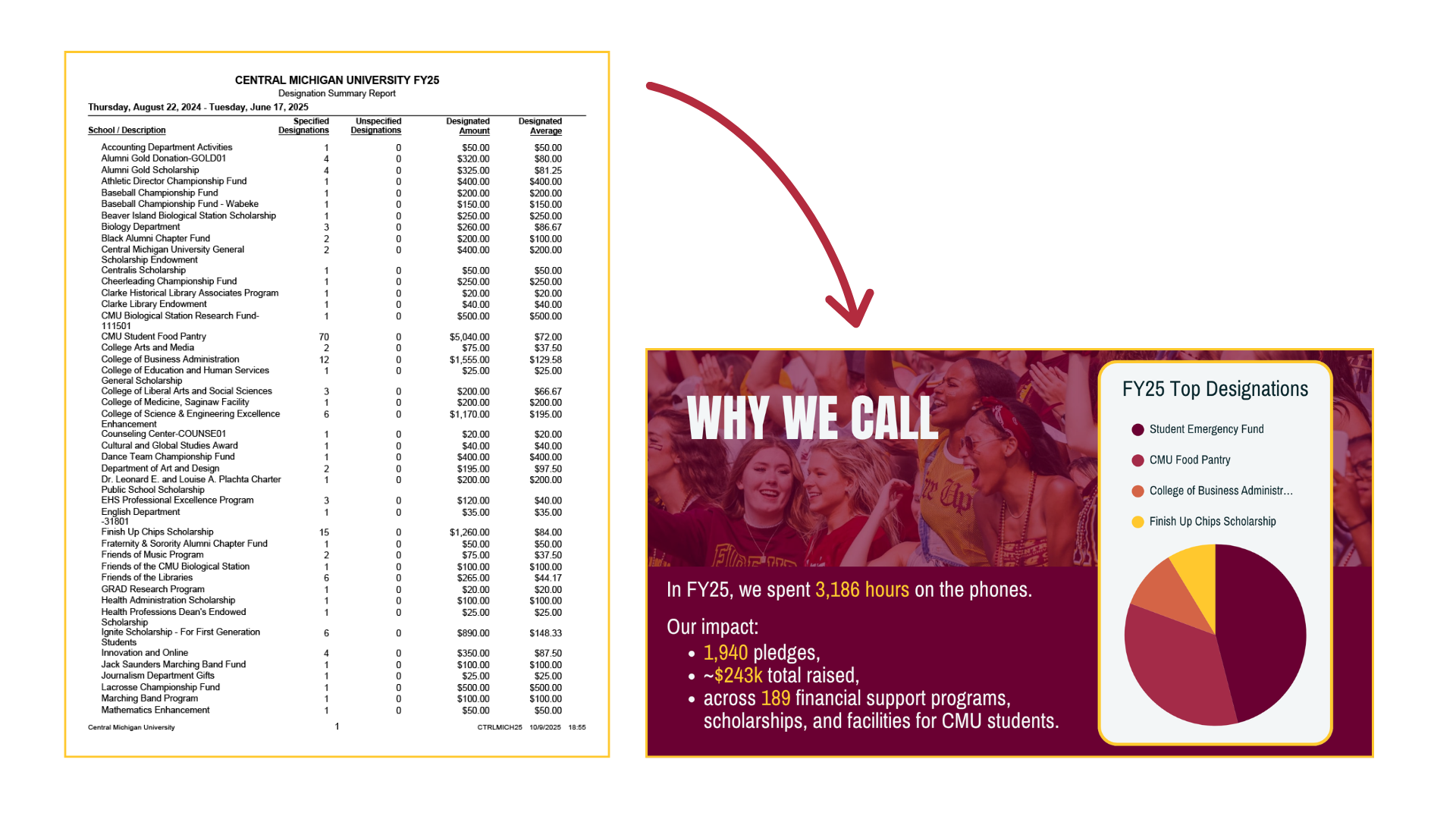
Interviewed the center manager and reviewed past years’ data reports to clarify learning objectives, desired outcomes, and current pain points in training.
Collaborated with center supervisory staff to closely align training with both the learners’ and facilitators’ needs.
-
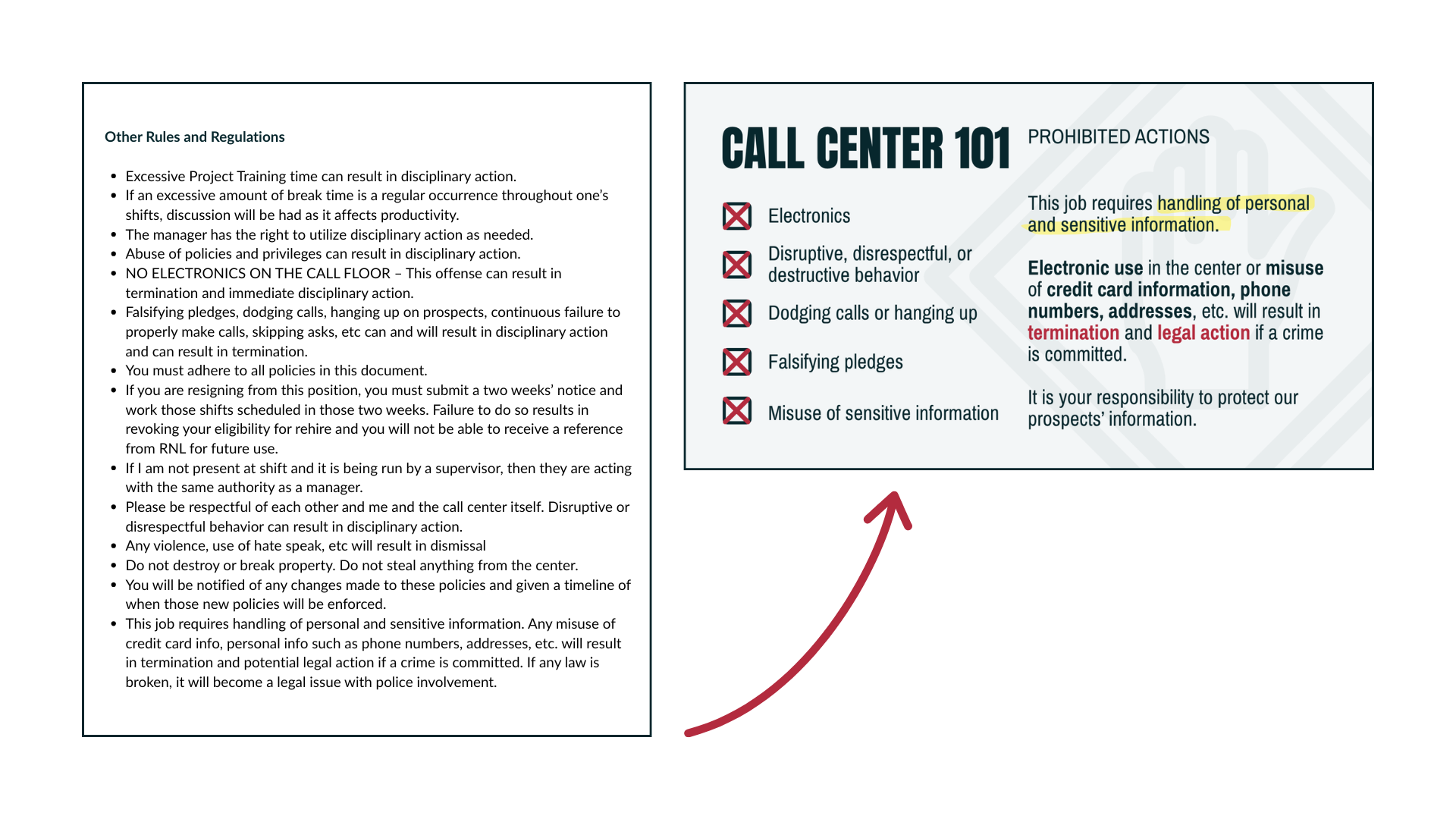
Aggregated and clarified existing materials, including policy documents, scripts, procedural notes, and data reports into a more current and learner-friendly flow, requiring less cognitive load to retain.
-
Developing course content and visuals with a branded, modern look that reflected CMU’s youthful and professional identity.
I prioritized clean layouts, simple icons, and color-coded sections to help learners retain key policies and procedures at a glance.
-
Sought feedback and iteratively tweaked course content based on supervisor feedback after several weeks of pilot delivery, improving clarity, consistency, and flow between sections.
Challenges + Solutions
Balancing procedural knowledge and soft skills
Solution: Student staff needed to master policies and data handling while also coming across as warm and genuine on donor calls. To balance these priorities, I integrated storytelling examples, realistic call scenarios, and quick reflection questions between policy slides.
Trimming down text-heavy existing materials
Solution: I consolidated and simplified language, applied consistent visual design choices, and built in discussion points and comprehension checks to help supervisors keep attention and float smoothly through information-heavy training.
Impact
Since implementation, 31 new hires have completed this training course under the facilitation of four supervisors. The call center manager reports that new ambassadors are performing more confidently and making fewer procedural mistakes, an early indication of measurably improved understanding and execution.